这几天一直在研究React应用,与React搭配的就是react-router,而且还支持了与VueRouter相同的集中型配置型路由表。其配置步骤如下:
第壹节安装依赖#
npm install react-router react-router-dom react-router-config第贰节根目录下新建一个router文件夹#
router
router.js
import React from 'react'
import {
  Home,Books,Electronics,Mobile,Desktop,Laptop
} from '../pages/pages.js'
import Root from '../App.js'

const routes = [
  {
    component: Root,
    routes: [
      {
        path: '/',
        label: '首页',
        exact: true,
        component: Home
      },
      {
        path: '/books',
        label: '书籍',
        component: Books
      },
      {
        path: '/elec',
        label: '商城',
        component: Electronics,
        routes: [
          {
            path: '/elec/mobile',
            label: '移动',
            component: Mobile
          },
          {
            path: '/elec/desktop',
            label: '桌面',
            component: Desktop
          },
          {
            path: '/elec/laptop',
            label: '笔记本',
            component: Laptop
          }
        ]
      }
    ]
  }
]

export default routes
路由表的内容大概就是这个样子啦 把App.js作为路由的主出口, 其他的path,exact属性同react-router的属性。label属性是为了配置面包屑。如果子组件下还有子组件就用routes数组包含起来。
第叁节在index.js文件中使用路由#
src
index.js
import React from 'react';
import ReactDOM from 'react-dom';
import { BrowserRouter as Router, Switch } from 'react-router-dom';
import './index.css';
import App from './App';
import * as serviceWorker from './serviceWorker';
import routes from './router/router.js'
import { renderRoutes } from 'react-router-config'

ReactDOM.render(<Router>
  {renderRoutes(routes)}
  </Router>, document.getElementById('root'));

// If you want your app to work offline and load faster, you can change
// unregister() to register() below. Note this comes with some pitfalls.
// Learn more about service workers: https://bit.ly/CRA-PWA
serviceWorker.unregister();
把路由挂载到App下, 现在整个app就有了router对象了
第肆节在组件中的应用#
在组件的使用很简单,App组件中会在声明的路由中传递一个route参数,route是一个对象, 以上面的配置的路由表为例:
//home.jsx
import { renderRoutes } from 'react-router-config'
function Home ({ route }) {
  return (<>
    {renderRoutes(route.routes)}
  </>)
}
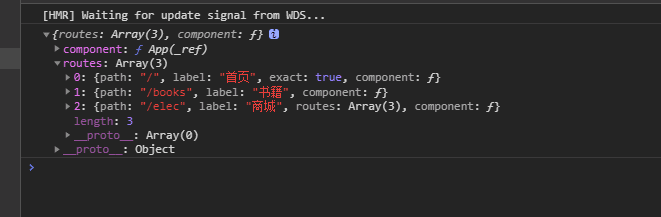
route对象形如:
就这样哪一个组件有子组件了, 就在哪一个页面下配置一下。
第伍节参考链接#
react-router-config 官方例子 react-router-config 搭建一个面包屑组件 react-router-config 的鉴权思想